 Ligarview
The Android app
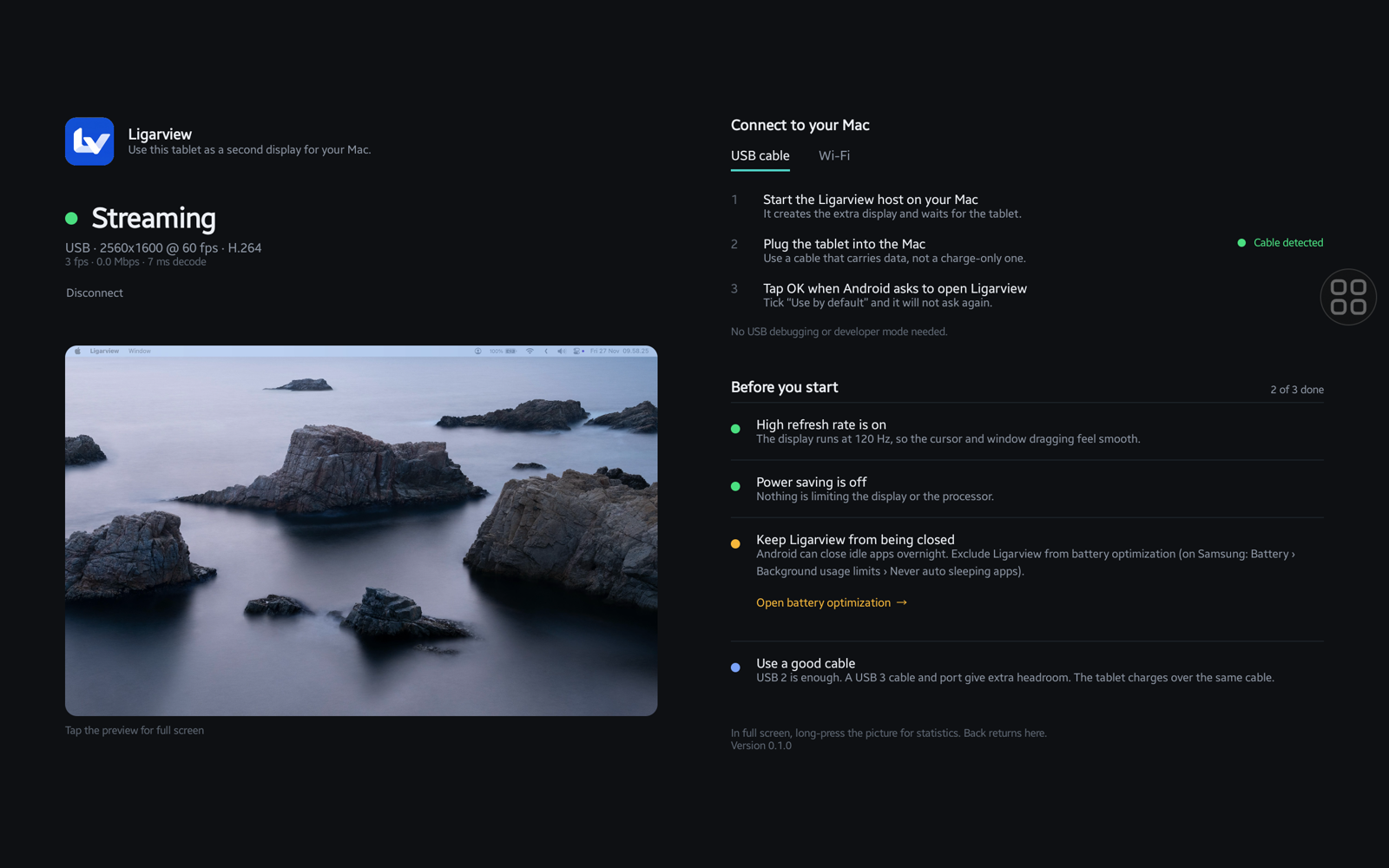
The app opens on an information screen and returns to it with Back.
Left: what is happening
- The state of the link: waiting, cable detected, connecting, streaming.
- While streaming: live fps, bitrate and decode time.
- A small live preview of the Mac screen, with the Mac’s cursor drawn in it. Tap the preview for full screen. Back returns to the info screen. Long-press the full-screen picture for a statistics overlay.
Right: connect and prepare
- How to connect: USB steps with a live “cable detected” indicator, or a Wi-Fi address.
- Recommendations, read from the tablet itself: whether the high refresh rate is on, whether power saving is off (it lowers the refresh rate and slows the decoder), and whether Android may close the app in the background. Each one links to the right settings page.
Layout
The app follows the tablet’s rotation. A portrait display fills an upright tablet exactly, and the info screen switches to one column in portrait.
Under the hood
It is built with Jetpack Compose. The picture is a SurfaceView fed by the hardware decoder; it is moved and resized between the preview box and the full screen, never recreated, so the stream keeps running. The cursor is a separate overlay painted once per display refresh.